Layouts, DZML & styles

Design the UI.
See it as the game draws it.

Edit .layout files on a live canvas with the game's own fonts, imagesets and styles, or write menus as HTML and let the Workbench compile them. Then give them a look of their own with the Style Studio.

DZML · the recommended way to start a UI

Write a menu as HTML

DZML is a DayZ menu written as an HTML page: one element per widget, its properties as classes. It is easy to read, to diff, and to ask an AI for.

  • Compile to the .layout the game loads, or decompile any existing .layout back to DZML.
  • Render it as the game would, before you start the game.
  • Scaffold: one step writes the .layout, the menu script that calls your buttons, and the key binding in inputs.xml.
<body data-dzml="vanilla">
<div data-dz="panel" data-name="Window" class="dz-wh-500px-260px dz-align-cc dz-c-1C1C1CF0">
  <span data-dz="text" data-name="Title" class="dz-xy-0-16px dz-align-tc dz-font-28">Warning</span>
  <button data-dz="button" data-name="CloseButton" data-on-click="Close" class="dz-wh-160px-40px dz-align-bc">Close</button>
</div>
</body>
Layout editor

A visual .layout editor

  • Widget tree, canvas, inspector: every widget class and property the game knows, with guides, snapping and safe zones.
  • Play mode: click through the menu before the game does.
  • Byte for byte: open and save any vanilla or mod layout without a single changed byte (1,266 tested).
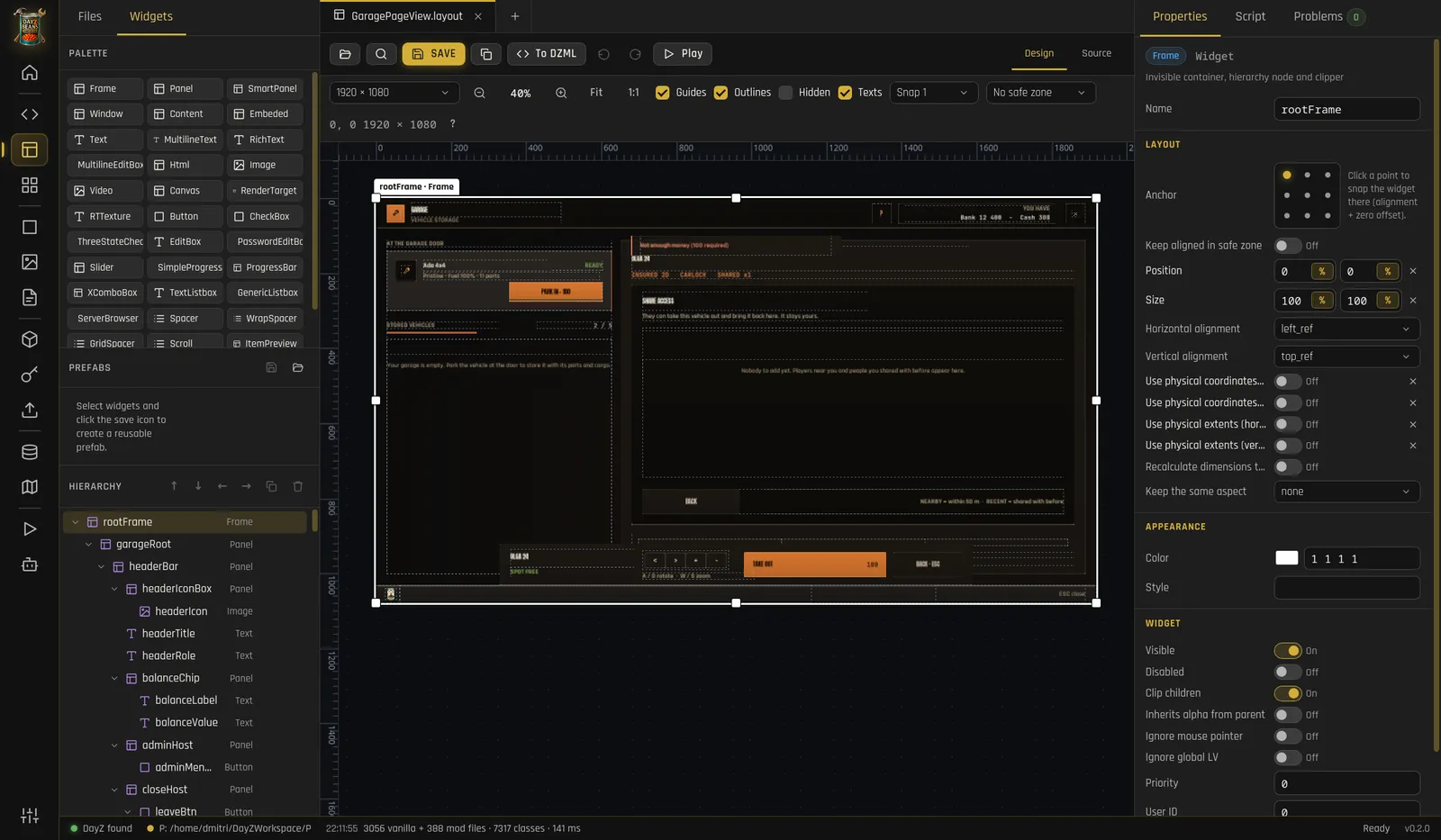

Layout Editor guide

Layout editor with the TraderX garage menu
The garage menu of the TraderX mod, opened in the layout editor.
Style Studio

Buttons, panels and icons of your own

Describe a style with a few colours and a corner radius, see every state live, and generate what the game needs.

_atlas.png / .edds.imageset.stylesDZML CSS1× · 2× · 4×
  • Every state: normal, hover, pressed, focus, disabled, checked, fill.
  • Library: every style of the game and of your mods, with its imageset found or missing.
  • Icons: draw UI icons from templates, exported to EDDS and an imageset.

Style Studio guide

TXBtnPrimary button, normal
TXBtnPrimary · normal
TXBtnPrimary button, hover
TXBtnPrimary · hover
TXBtnDanger button
TXBtnDanger
TXInputField, focus
TXInputField · focus
TXTab, active
TXTab · active
TXWarningBox
TXWarningBox

Styles of the TraderX mod, made in the Style Studio.